
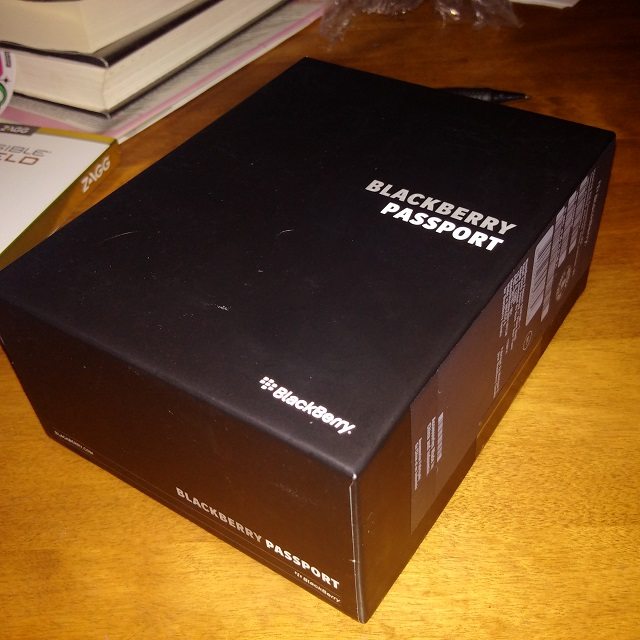
**Congratulations to Guy Lemaire on winning the BlackBerry Passport!**
Here at Gadgism.com, we are so excited to Work Wide that we are giving you all a chance to win a BlackBerry Passport smartphone!
Want to have a chance at being a lucky winner? Then follow the easy steps below to enter:
1. Follow @Gadgism on Twitter:
2. Like and Share Gadgism on Facebook:
3. Follow Gadgism on Google+:
4. Copy and paste the following from your Twitter,Facebook or Google+ account:
” I want to #WorkWide with a @BlackBerry Passport from @Gadgism. You can enter too! Enter here: http://bit.ly/1nkcQbu #BlackBerryPassport ”
5. Leave a comment below telling us what your favorite new feature is in BlackBerry 10.3 to confirm you have completed all the necessary steps.
6. That’s it! Good luck!
Contest runs until 11:59pm EST on October 3rd, 2014.


i love everything on blackberry <3
Congrats, Guy! Enjoy your new Passport. :)
Dark Hub must be On 10.3
Touch pad on keyboard BlackBerry passport is very awesome. The Big screen and BlackBerry Blend I can’t wait it.
The panorama feature of the camera,the easier keyboard flicks,the battery life, overall UI.
Blend Ofcourse !
after having a hands on look i’m looking forward to a large Screen(currently using a Q10) blackberry 10.3, android apps without side loading. A gold version would be prime but i will take white.
I just say blend!
The Amazon App Store is a great feature, even if it may be a bit confusing.
I am in love with the passport. Blend, assist, and battery life would be my favorites. I’m a die hard blackberry fan that is stuck in a contract but would love a BlackBerry Passport. Thanks Linda
The best is offcourse the blackberry assistance! That’s a pure beauty
I love the keyboard on the Passport. THIS is true innovation. Great job thinking outside the box, BlackBerry
I love the physical qwerty keyboard! And i actually like the size of it! It’s perfect for me!
I have been a BlackBerry user for 9 years! This has to be the ultimate users tool. I need to replace my Z-30, please!
Cant wait to try out the new touch sensitive keyboard!
For the feature that has my attention is definitely the screen size! To be able to see everything without scrolling around would be a dream.
I’m most excited for the amazon app store! Developers needs to make more apps avail on #BB10!
❄ can’t wait for “Stay Awake”…the display don’t time out and go dark, in му hands :)
Besy BlackBerry ever!!!!
I’ve been a crackberry fan for years! I’m running 10.3 now on my Z10, and can’t wait for to experience Blend!
My favorite feature in BlackBerry 10.3 is quick actions in hub, for quick delete, archive and other options in my hub
I’m excited about BLEND… can’t wait to get this Passport and get life moving without stamps!
I’m happy customizable ringtones and notifications was implemented. Was fine with hub ++. But glad it’s part of OS
The feature I was most looking forward to is the ability to maintain 2 different wallpapers on each of the 2 screens, lockscreen and homescreen. It might seem rather trivial, but I lurrrrrv it :D
Battery is amazing I hear
The improved Android app compatibility and efficiency is my favorite feature of 10.3
The feature that i like in the Blackberry 10.3 is the homescreen that i can personalize.
I love the battery capacity, the qwerty keyboard, the design. Basically everything. :)
I certainly love the higher screen resolution, the longer battery capacity and the bigger internal memory capacity of the new Blackberry Passport.
Looks great and a powerful phone, packed to the punch with new features, my fave is “Blackberry Assistant” which seems to be complete control over the settings and apps within BB10.3. Exciting times. Followed all steps above.
Can’t wait to get my hands on that gorgeous screen!
Blackberry Blend and the notification meeting mode. There is nothing more embarrassing than fogetting to put your phone in silent mode before going into a meeting and then have your phone going off like crazy.
For me the touch enabled keyboard is the best
For me, Instant actions is probably the best feature keeping productivity and efficiency in mind :) #WorkWide #WorkBright
i have to try the new hub!!!!!!cheeers from italy
Looking forward to using Blend! And the updated Android runtime will be nice as well. Can’t wait!
I’m loving the Blend software and what it has to offer! Hoping to win the Passport!
i’m looking forward to Blend and a slight change in the browser… the passport rocks!!!
I like the subtle changes within the Hub. An example of this would be the ‘one touch’ delete feature that’ll allow me to purge spam on glance, first thing in the morning. Outside of BBOS 10.3 it has to be the screen right? ….and to think I was going to buy an iPad Mini for casual sofa-surfing too, shame on me.
My favorite feature for the Passport is BlackBerry Blend and the extended Battery life is a big one for sure.
All steps completed. Favourite feature is definitely BlackBerry Blend. I spend most of the day at the desk, so BBMing directly from there will definitely be valuable.
No one has developed such a great product in years! I’m excited to get one on Videotron (if they carry it!)
Congrats Guy! You’ve been selected as the potential winner. Please check your inbox for more information!
I could use a passport phone
With whole lot of improvements in User Interface ,Blackberry assistant ,Unique Keyboard functionality for easy and better typing ,Built in amazon app store and improved blackberry hub for straight away deletion of messages along with many more features is why i consider 10.3 to be an OS whom we will love and render in our heart .
My favorite feature, the one I use daily on my z30 is Instant action in HUB. My second would be the advanced interactions: Flip to mute, Flip to standby, Lift to wake. The feature I am most looking forward to activate is BlackBerry Blend.
Blackberry Blend and the Amazon app store. I freaking love Blackberry’s new CEO.
The ability to use BlackBerry Blend!
Amazon App Store build in!
For me it’s definitely Blend!
the best of 10.3 is advanced interaction on the Settings and HUB
The assistant is terrific, great new camera and media player features, more efficient hub, but my FAVORITE is Blend. I’ve missed using Bridge and this kicks it up a few notches!
I am really looking forward to BlackBerry Assistant in 10.3!
Thanks Gadgism and good luck everyone! :)
The touch keyboard for sure!
The touch keyboard is genius. Best way to keep your screen clean! :D
Touhc keyboard is an awesome feature along with the ability to BLEND!
Simple. Blend is the best feature to 10.3 :)
The touch keyboard
Blackberry Blend, and Amazon App Store!
Slow-mo camera and BB Blend for sure
need dat passport.
contest FAIL!
Absolutely loving the new look to the UI. New search and virtual assistant looks amazing!
Awesome! Would love to win this thing!
FINALLY…The Landscape/Portrat/Landscape view insanity has a cure!!!! We can stop flipping our phones from one view to another.
That has to be my all time favorite feature of the Passport with 10.3.
I’m looking forward to the touch keyboard.
I’m enjoying the quick actions option in the hub.
Love the touch keyboard, the only thing like that out there!
Favourite features in 10.3 Amazon Store and Assistant. Haven’t tries yet but looking forward.
best feature hands down is the trackpad keyboard with its swipe-up predictive words, i love BB10 on my Q10 but on a Passport it can release its full potential with the great 4.5″ screen! Welcome back Blackberry!
Favourite new feature in 10.3 would have to be BlackBerry Assistant. Haven’t used voice control functions very much, but now that it’s that much more robust, I will use this.
My favourite 10.3 feature is the compatibility with Blend. Blend is a game changer for me.
My favourite BlackBerry 10.3 feature has to be BlackBerry Blend allowing for even more productivity!
Hello,
My twitter is @BBKingdomWeb – you should have seen my tweet. I would love to win the BlackBerry 10 device, and there are a number of features I love about the operating system. The three things i like best about the Passport are: the wide screen, this should be good for not only games, but also chats, and viewing photos. The specifications – the Passport features up-to-date specifications now, and if the previous BlackBerry 10 devices could run well on dual-core processors and such, imagine how smooth the Passport would be. And thirdly, the BATTERY! Woo, that’s a brilliant batter no-doubt, better than the Z30, the Passport should have brilliant battery life.
I am really looking forward to the Passport releasing here, that is, if it does. Thank you for this wonderful giveaway, would really like to win the BlackBerry Passport – it seems like an excellent device!
Thanks again for the great giveaway
My favorite feature of 10.3 has to be instant actions in the HUB. The BlackBerry HUB made things simple before but now I’m even more efficient thanks to instant actions.
I’m definitely looking forward to having the Amazon app store preloaded on the device. I’m also looking forward to that touch enabled keyboard.
My favorite new feature of the Blackberry 10.3 is the Amazon App. It hugely increases the quality of the BlackBerry ecosystem (which was one of the main problems in the previous software versions).
Looking forward to try out BlackBerry Blend, I hink it’s a promising software. It’s definitely for people who wants to get things done!
Okay, accidently posted a comment that I wasn’t ready for yet. My favorite feature of 10.3 was the design cleaning of the entire ui. I hated the black shadows behind the apps before, now they have cleaned that up. Overall everything looks a bit better
My Favorite feature by far will be Blend….then the using the keyboard to swipe and scroll
Is it alright if the passport was so nice. That didn’t make sense at all
Best screen shape ever! Like Malevich “black square”
I’ve got to say BlackBerry Blend and the fact that the earpiece volume adjusts to the noise level of your surrounding.
My favorite new feature would have to be the Amazon App world. I have waited so long for Instagram to be usable on a Blackberry. It has been years and now it is a reality! Woo hoo!!
Everything! <3
The best feature is the new keyboard is fantastic!
My favourite feature? There are a lot of features they are really fantastic. The new OS 10.3, the Keyboard, the Screen, BlackBerry Blend, BlackBerry Assistant and much more. This device is absolutely fantastic and I hope to hold it in my hands as soon as possible. Best regards, Michael
Definitely the Blend and the Assistant!
Blend, baby, blend!
I love new icons and free home Page with date :-)
My favourite feature, huh? Well its a long list, But some of the most outstanding new features I really appreciate are; the instant reply from the hub, the new assistant manager, the picture app where you’ve got the time line feature and ofcourse Blend. 10.3 and the passport is a milestone for BlackBerry . It’s the perfect comeback for BlackBerry. I would so very much love to have a BlackBerry Passport. BlackBerry Passport is the real deal for serious productivity and yes Security too, That’s what BlackBerry is all about. I’m a proud member of #TeamBlackBerry who would love to have the BlackBerry Passport.
I like the weekly agenda, and the endless folders
I could use a passport. No I need a passport
I could use a passport phone
The #BlackberryPassport means business..love the new and innovative keyboard best
I just celebrated my bday and was hoping to have the Passport. My fave feature is the BlackBerry Assistant. I can’t wait to check it out in person!
Keyboard and Blend with a 1:1 ratio. I like it all.
I love the options for dark themes and BlackBerry Blend. Awesome!
I love the new quick access, and the new BlackBerry Blend!!! Talk about efficiency!
I love the new quick access, and the new BlackBerry Blend!!! Talk about efficiency
My favourite features are the Assistant and BlackBerry Blend
Best feature is definitely the ability to use BlackBerry Bend!
Best 10.3 feature is the assistant hands down. Best passport feature is the touch keyboard.
My favorite new features in BlackBerry 10.3 are the Assistant, new UI, BlackBerry Blend, Amazon Store. I love my BlackBerry and i want to win a Passport.
My favourite feature is Blend. Also I love fetch to screen ability, so I can work wide with all the apps, even it was Android apps.
I do really wanna try how Passport make my world become wider than ever.
Fav for 10.3 so far is Blend and updated UI
My favorite item in Blackberry is the improved voice assistant controls, for example, I can say “turn of WiFi” and it will automatically do it.
My favorite new feature is the Assistant! That’s going to come in handy as the 10.2 voice controls absolutely cannot compare. How can you not find that at all useful? You can do everything with it, including typing in what you need it to do for you as well. I love how the on screen analyzer flashes with an icon of the task you’re asking it to do to confirm that it was doing what you asked. That’s both audio and visual confirmation. Good luck to everyone!
BBM Now , replying to bbm anytime in any app anywhere.
The new UI, lift to wake, everything, endless folders, awesome camera features, everything and, obviously, Blend.
Best Thing About 10.3 is new faster android runtime…. Can bring my developed for android apps to BlackBerry…
Best thing about BB10.3 is the new voice assistant
Blend is where it is at. I hope I win.
So many great new features from the camera to the new hub in 10.3. Hub is now even better
Favorite for 10.3 is the new hub, even better and easier than in 10.2
One of my favourite things that BB 10.3 has to offer is the advanced interactions and how more efficient the OS integrates in our day to day lives.
I’m really intrigued by the touch sensitive kb…Can’t wait!
Favorite part of 10.3 is the new BlackBerry Assistant and looking forward to Blend
Favorite feature is definitely the touchpad keyboard!!
Unlimited items in a folder in 10.3! Finally!
Favourite feature in BlackBerry 10.3? Hmmm hard to pick just one. I like the instant action icons in the Hub (sorry if I’ve got the name of it wrong, the blue highlighted icon eg Reply All in email or Reply in Twitter or Compose in the main Hub). On my Z10 running 10.3.0.1154 it makes responding to emails, tweets, etc faster.
Blend…need this.
Very excited about BlackBerry Blend.
I don’t have just one favourite thing in 10.3, it’s all around leaps and bounds better from previous iterations. The camera improvements, the updated runtime, the cleaner look of everything, opening and closing apps is far smoother/faster- it’s great.
Blend
The capacitive keyboard! And because Passport is really a unique device
My fave thing is the screen size and the touch keyboard
My favorite 10.3 has to be the refreshed UI. The flat icons with no border, the decreased toolbar & button sizes really help on the Q10. I also enjoy the additional icons in the application grid.
Endless folders! I have way too many apps so being able to put them into one nice folder makes me very happy :)
Twitter:Hestar69
My favorite feature is the larger screen. I love my Q10 but my only wish was that the screen was larger. The Passport is the exact thing I’m looking for. I have dreams at night… D:
Panorama feature, flat look, and quick actions in hub
All my favorite features have to do with the home screen. Such as endless folders, “running apps grid” and fast quick settings access.
My Favorite feature on BlackBerry 10.3 is:
1. can open quick settings on any place just swipe down from up to down with just 2 fingers.
2. Can set different wallpaper both Lock screen and home screen.
3. Can show my wallpaper on the home screen Beacuse homescreen is “always be there “.
4.With BlackBerry Hub instant Action , we can quickly reply such as BBM without opening the chat or delete any emails without opening the messages.
5. Endless folder, can have a lot of Apps in one folder without limit.
6. Meeting Mode, automatically my notifications goes silent when my schedule on calendar app start and goes back to normal when schedule is done.
7. Panorama mode on Camera app, now I am not using again third party app for panorama mode dan it’s awesome!
8. Timer mode on Camera app, no need third party app to use this feature.
9. BlackBerry intelegent Assistance, I can ask or do something just use my voice!
10. Equalizer feature on Music App, I love it! I can choose the difference equalizer now… It’s awesome.
Maybe a few of my favorite features…
Btw my Twitter is @radewa, Facebook : http://www.facebook.com/gabrielradewa, My G+ Is Gabriel Radewa Purba. Hope I can win. :-)
My favorite feature in BlackBerry 10.3 is the ability to access the Quick Settings from anywhere by swiping down the screen from the top using 2 fingers. I always activate the Rotation Lock feature to prevent the screen from changing the view when I accidentally turn the phone a bit to the left or to the right. The problem is that when I’m watching a video (from Youtube mostly), I need to go back to the home screen to access the Quick Settings and disable the Rotation Lock. Now in BlackBerry 10.3, I can disable the Rotation Lock right from the browser or from my video player. For me, this is very useful and I really love it !
BlackBerry blend best new feature
Favorite feature in bb10 10.3 is endless folders, put as many apps in a folder.